Video: Image Halftoning (Python)
A companion to the video “QUBO++ Case Study: Image Halftoning (Python)”. For each chapter it gives the main points, the program shown in the video with the results, and links to the pages that explain more. Click “▶ Play the video from …” to play from that scene. Programs that the video shows in part are given here in full, ready to run.
What the video covers:
- Halftoning, which shows a grayscale image with white and black dots only, and the error as the eye sees it, modeled with a Gaussian filter
- DBS (Direct Binary Search), a widely used method of binarization
- Writing the sum of squared errors as a sparse QUBO, with no auxiliary variables and no constraints
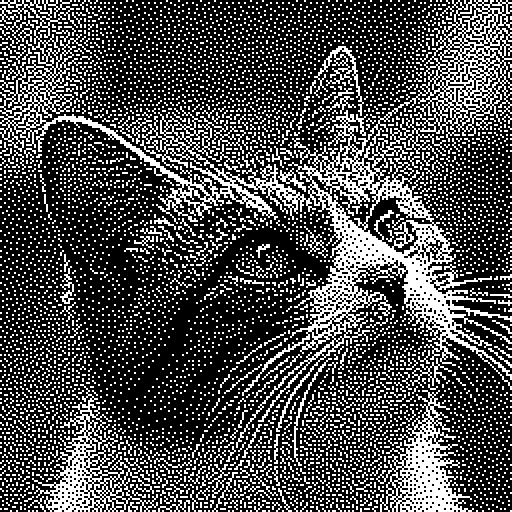
- A 256 × 256 photo of a cat solved by DBS, by ABS3 only, and by ABS3 given the DBS image as a hint, compared by energy and by the images
Back to the list of Videos (Case Studies)
What is halftoning
Halftoning turns a grayscale image into white and black dots only; it is used on media that show only white or black, like newspaper photos and monochrome printing. A pixel value is the brightness from 0 (black) to 255 (white). Bright places get many white dots, and dark places get few. From far away, a fine black-and-white pattern averages in the eye and looks like a middle brightness (32 white pixels of the 64 in an 8 × 8 block look middle gray).
Error as the eye sees it
The blur of the eye is modeled with $G$, a 7 × 7 integer Gaussian filter: 31 at the center, smaller outward, and its 49 weights add up to exactly 255.
\[G = \begin{pmatrix} 0 & 0 & 1 & 1 & 1 & 0 & 0\\ 0 & 1 & 5 & 7 & 5 & 1 & 0\\ 1 & 5 & 14 & 21 & 14 & 5 & 1\\ 1 & 7 & 21 & 31 & 21 & 7 & 1\\ 1 & 5 & 14 & 21 & 14 & 5 & 1\\ 0 & 1 & 5 & 7 & 5 & 1 & 0\\ 0 & 0 & 1 & 1 & 1 & 0 & 0 \end{pmatrix}\]- The binary image blurred by this filter is taken as the image on the retina. The blurred value at pixel $(i, j)$ is the sum of the pixels of the 7 × 7 window around it times the weights (white is 1, black is 0).
- The error of a pixel is the retina image minus the original image.
- The smaller the sum of squared errors, the closer the image looks to the original from afar.
DBS
DBS (Direct Binary Search) is a method of binarization based on the human visual system that minimizes the sum of squared errors between the retina image and the original.
- Start from a binary image made with a random threshold.
- Go pixel by pixel in raster order from the top left; at each pixel, try flipping it and swapping it with each of its 8 neighbors of the other color (moving a dot by one pixel). Make the change that lowers the sum of squared errors the most, only if it lowers it.
- Repeat sweeps over the whole image until no pixel lowers it.
For the cat photo in the video, DBS stopped after 13 sweeps, in about 0.8 seconds, and the sum of squared errors fell from about 50 million to about 4.2 million. With flips only, dots cannot move, and it gets stuck above 7 million: moving a dot takes two flips, and the first flip increases the error.
See Halftoning for more.
As a QUBO
Each pixel of the output gets a binary variable $x_{ij}$: 1 for white, 0 for black. $E(x)$ is the sum over all pixels of the squared difference between the blurred binary image and the target $T_{ij}$.
\[E(x) = \sum_{i,j} \bigl( (G * x)_{ij} - T_{ij} \bigr)^2, \qquad (G * x)_{ij} = \sum_{k=0}^{6} \sum_{l=0}^{6} G_{kl}\, x_{i+k-3,\, j+l-3}\]- The blurred values are linear in the variables, so $E(x)$ is quadratic: a QUBO as it is, with no auxiliary variables and no constraints. The energy of the QUBO is exactly the sum of squared errors.
- DBS makes only changes that lower it, so it is a local search of this QUBO. A QUBO solver can therefore solve the same problem.
- At the edge of the image the window sticks out and the sum of the weights that reach it, $m_{ij}$, is below 255, so the target shrinks too: $T_{ij} = \mathrm{round}(I_{ij}\, m_{ij} / 255)$ ($I_{ij}$ is the pixel value of the original image).
- The target is the original image itself, not blurred: edges come out sharper than with a blurred target, and look nicer.
Variables and terms
| A 256 × 256 image | Count |
|---|---|
| Variables (pixels) | 65,536 |
| Partners of an inner pixel in products | 128 |
| Terms | 4,171,656 (about 64 per pixel) |
Expanding the squares gives products of the variables of two pixels in the same window; such partners lie within 6 pixels in each direction (a 13 × 13 range). The number of terms grows with the number of pixels, far fewer than all pairs: a sparse QUBO. Still, there are $2^{65536}$ placements, too many to try.
Program
The PyQBPP program that solves it with ABS3. The file input and DBS, which the video skips, are written out here. Put the input image halftone_cat.pgm (PGM format, 256 × 256 pixels) in the directory where you run it.
Gis the filter for the error as the eye sees it,blurblurs an image withG(pixels outside the image are 0), andtargetis the target.qbpp.varmakesx, a 256 × 256 array of binary variables, andqbpp.concatadds a 3-wide border of zeros around it, givingxp. Shifted slices ofxptimes the weights add up to the blurred valuesconv.- Subtracting
targetfromconv, squaring, and summing it all withqbpp.sumgivesf.simplify_as_binary()tidies it up, and it goes to ABS3Solver. - The first
search, with a time limit of 60 seconds, uses ABS3 only. The second passes a solution made fromdbs, the binary image from DBS, as thehint, and starts from the DBS solution.
import random

import pyqbpp as qbpp

M = 3
G = [[0, 0, 1, 1, 1, 0, 0],
     [0, 1, 5, 7, 5, 1, 0],
     [1, 5, 14, 21, 14, 5, 1],
     [1, 7, 21, 31, 21, 7, 1],
     [1, 5, 14, 21, 14, 5, 1],
     [0, 1, 5, 7, 5, 1, 0],
     [0, 0, 1, 1, 1, 0, 0]]                  # integer Gaussian (sum = 255)
ROWS = COLS = 256

# img: a 256 x 256 2-D array (pixel values 0-255), read from a PGM (P2) file
with open("halftone_cat.pgm") as fp:
    tokens = fp.read().split()
img = [[int(v) for v in tokens[4 + i * COLS:4 + (i + 1) * COLS]] for i in range(ROWS)]


def blur(a):
    # convolution with G (pixels outside the image are 0)
    out = [[0] * COLS for _ in range(ROWS)]
    for i in range(ROWS):
        for j in range(COLS):
            for k in range(2 * M + 1):
                for l in range(2 * M + 1):
                    if 0 <= i + k - M < ROWS and 0 <= j + l - M < COLS:
                        out[i][j] += G[k][l] * a[i + k - M][j + l - M]
    return out


# target T: the image itself (scaled down near the border)
mass = blur([[1] * COLS for _ in range(ROWS)])
target = [[round(img[i][j] * mass[i][j] / 255) for j in range(COLS)]
          for i in range(ROWS)]

x = qbpp.var("x", ROWS, COLS)
xp = qbpp.concat([0] * M + [x] + [0] * M, axis=1)
xp = qbpp.concat([0] * M + [xp] + [0] * M, axis=0)
conv = qbpp.expr(ROWS, COLS)                    # (G * x)
for k in range(2 * M + 1):
    for l in range(2 * M + 1):
        if G[k][l]:
            conv += G[k][l] * xp[k:k + ROWS, l:l + COLS]
f = qbpp.sum((conv - qbpp.array(target)).sqr())  # sum of squared errors
f.simplify_as_binary()

solver = qbpp.ABS3Solver(f)
sol = solver.search(time_limit=60)              # ABS3 only
print("ABS3 energy =", sol.energy)


def inside(i, j):
    return 0 <= i < ROWS and 0 <= j < COLS


def overlap(i, j, i2, j2):
    # how much the blurs of pixels (i, j) and (i2, j2) overlap: the sum of G(q - p) G(q - p2) over q in the image
    s = 0
    for k in range(2 * M + 1):
        for l in range(2 * M + 1):
            k2, l2 = i + k - i2, j + l - j2
            if inside(i + k - M, j + l - M) and 0 <= k2 <= 2 * M and 0 <= l2 <= 2 * M:
                s += G[k][l] * G[k2][l2]
    return s


# for pixels whose blurs stay inside the image, overlap depends only on their offset: compute it once
INNER = {(di, dj): overlap(2 * M, 2 * M, 2 * M + di, 2 * M + dj)
         for di in range(-2 * M, 2 * M + 1) for dj in range(-2 * M, 2 * M + 1)}


def ov(i, j, i2, j2):
    if M <= min(i, i2) and max(i, i2) < ROWS - M and M <= min(j, j2) and max(j, j2) < COLS - M:
        return INNER[(i2 - i, j2 - j)]
    return overlap(i, j, i2, j2)


def direct_binary_search(seed=1):
    # DBS: of the flip and the swaps with the 8 neighbors, take the one that lowers the sum of squared errors most;
    # repeat raster-order sweeps until no pixel lowers it
    rng = random.Random(seed)
    b = [[1 if img[i][j] > rng.randrange(255) else 0 for j in range(COLS)]
         for i in range(ROWS)]                       # start from random thresholds
    blurred = blur(b)
    err = [[blurred[i][j] - target[i][j] for j in range(COLS)] for i in range(ROWS)]
    c = blur(err)                                    # c[i][j]: inner product of the blur of pixel (i, j) and the error

    def delta(i, j):                                 # change of E when pixel (i, j) is flipped
        return 2 * (1 - 2 * b[i][j]) * c[i][j] + ov(i, j, i, j)

    def flip(i, j):
        d = 1 - 2 * b[i][j]
        b[i][j] ^= 1
        for i2 in range(max(0, i - 2 * M), min(ROWS, i + 2 * M + 1)):
            for j2 in range(max(0, j - 2 * M), min(COLS, j + 2 * M + 1)):
                c[i2][j2] += d * ov(i, j, i2, j2)

    while True:
        changed = 0
        for i in range(ROWS):
            for j in range(COLS):
                d0 = delta(i, j)
                best, partner = d0, None             # flip
                for i2 in range(i - 1, i + 2):       # swap with a neighbor of the other color
                    for j2 in range(j - 1, j + 2):
                        if inside(i2, j2) and b[i2][j2] != b[i][j]:
                            de = d0 + delta(i2, j2) - 2 * ov(i, j, i2, j2)
                            if de < best:
                                best, partner = de, (i2, j2)
                if best < 0:
                    flip(i, j)
                    if partner:
                        flip(*partner)
                    changed += 1
        if changed == 0:
            return b


# dbs: the binary image from DBS (a 2-D array of 0 / 1)
dbs = direct_binary_search()
hint = qbpp.Sol(f).set({x[i][j]: dbs[i][j] for i in range(ROWS) for j in range(COLS)})
print("DBS energy =", f(hint))
sol = solver.search(time_limit=60, hint=hint)   # the DBS image as the hint
print("ABS3 + hint energy =", sol.energy)
An example of the output of this program (ABS3Solver gives different results on each run; an example on NVIDIA GB10):
ABS3 energy = 3863459
DBS energy = 4206279
ABS3 + hint energy = 3882572
The DBS here starts from different random numbers than the DBS in the video, so its energy differs a little (4,207,803 in the video). With two searches of 60 seconds and the DBS in Python, the whole program takes a little over 2 minutes.
See Halftoning, Slice and Concat and ABS3 Solver for more.
Comparing the three
DBS only, ABS3 only and ABS3 with the hint are compared by how the energy (the sum of squared errors; lower is better) changes over time (on a logarithmic scale). Each ABS3 run searched for 60 seconds on a computer with two GPUs. ABS3 with the hint starts its search after DBS has finished.
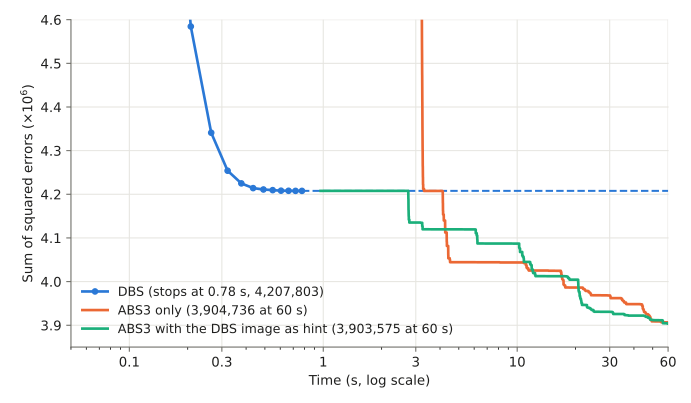
The results in the video (DBS depends on its random starting point, and ABS3 gives different results on each run):
| Stops / passes DBS | Final energy | |
|---|---|---|
| DBS | stops after 13 sweeps, about 0.8 seconds | 4,207,803 |
| ABS3 only | passes DBS in a little over 3 seconds | 3,904,736 |
| ABS3 with hint | starts from the DBS solution; better than ABS3 only for the first few seconds | 3,903,575 |
After 60 seconds, the two ABS3 runs reached almost the same value, about 7% lower than DBS. DBS is fast, and ABS3 takes time to reach an even lower energy.
Comparing the images
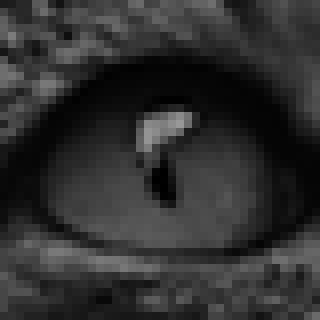
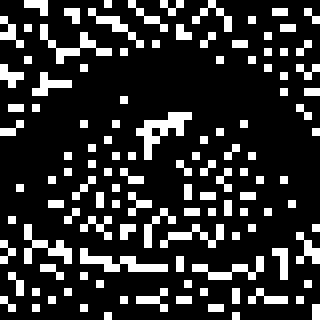
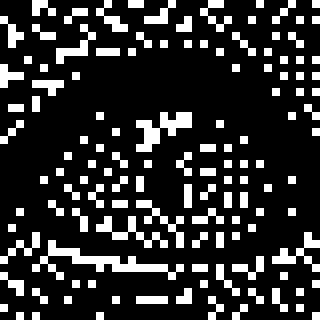
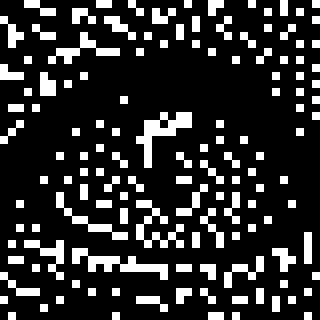
From the left: the original image and the binary images from DBS, ABS3 only, and ABS3 with the hint (the results in the video).
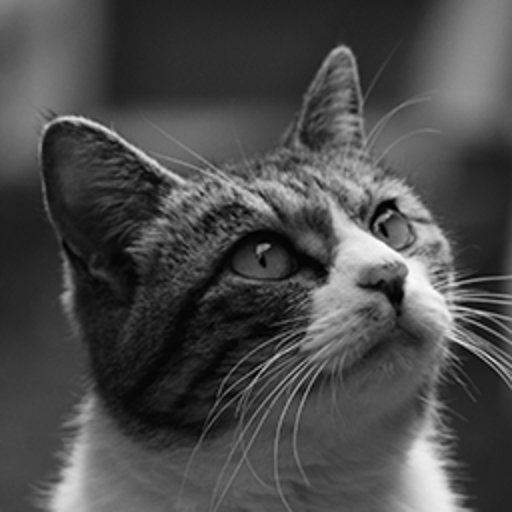
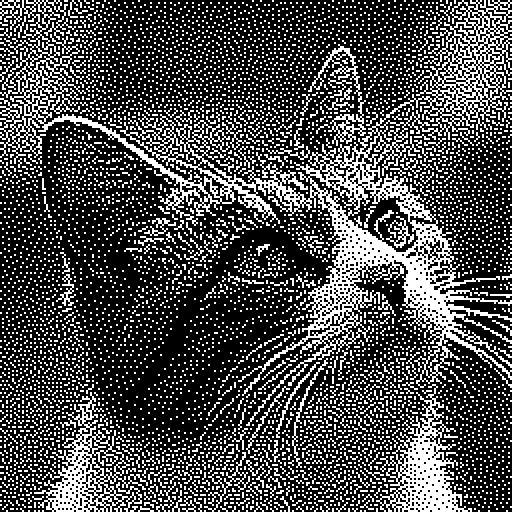
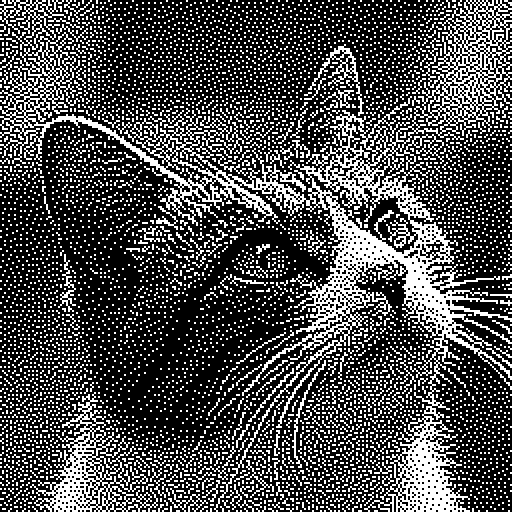
Zoomed in around the eye, the dots are placed a little differently, but which one is closer to the original cannot be seen by eye.
| Energy | Error per pixel | |
|---|---|---|
| DBS | about 4.21 million | 8.01 |
| ABS3 only, ABS3 with hint | about 3.90 million | 7.72 |
The error per pixel ($\sqrt{E / 65536}$) differs by about 4%. For the look of the image, DBS is good enough in practice; the difference shows clearly in the energy numbers.
Summary
- Halftoning can be written as a sparse QUBO that minimizes the error the eye sees. The sum of squared errors is exactly the energy of the QUBO.
- DBS is a local search of this QUBO, and gives a good image fast.
- A QUBO solver finds solutions with lower energy than DBS.
- The three images look the same, so in practice DBS is enough.
- It is a QUBO of a handy size, and a larger image makes a larger one: an interesting benchmark for QUBO solvers.